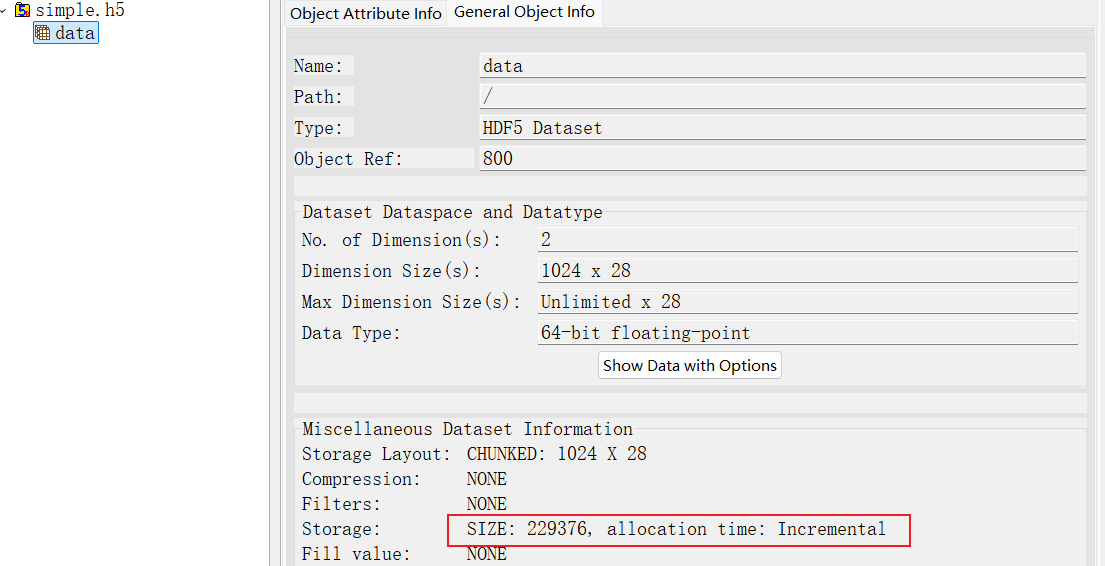
I’m using the HDF5 C API in my project. I created an extendible dataset and expanded it to dimensions (2000, 28). Later, I needed to shrink the first dimension to discard the last 1000 rows, reducing the dataset size to (1000, 28). I used H5Dset_extent to adjust the dataset extent. However, I noticed that the disk size of the HDF5 file did not decrease after shrinking the dataset. Therefore, I would like to know whether there is any way to actually reduce the disk size of the HDF5 file after shrinking the dataset.
In general, H5Dset_extent should shrink the total size of the file on disk once the changes are flushed to disk. I replicated the workflow you described and saw the on-disk size decrease with HDF5 2.0.0, 1.14.6, and 1.10.9. What is the datatype and layout type of your dataset?
If you built HDF5 with tools, you may also be able to use h5repack to create a new file containing the same data, but with the smaller size.
EDIT: If you have a long-running workflow, it’s also possible that your changes haven’t been flushed to disk yet. You can use H5Dflush/H5Fflush, or close the file (and all objects inside of it) to force changes to disk.
Thank you very much for your quick reply. I am using HDF5 version 1.14.4. I created a chunked dataset with the shape {H5S_UNLIMITED, 28} and datatype H5T_NATIVE_DOUBLE. At the beginning, I expanded the dataset row by row until it reached (2000, 28). Then I shrank the dataset to (1000, 28), called H5Dflush, and closed the dataset and file. Although HDFView shows that the dataset size was indeed reduced, the file size itself did not decrease.
Sorry, let me clarify my description. I tested on another computer:
when the initial size is (2048, 28) and I shrink it to (1024, 28), the file size decreases from 452 KB to 228 KB, as expected.
However, when the initial size is very large, for example (8000 × 1024, 28), and I shrink it to (1024, 28), the file size only decreases from 1.70 GB to 820 MB. The reduction ratio is far from what I expected. This second case matches the dataset sizes used in my production scenario.
The attachment contains my test code hdf5.cpp.
EDIT: Additionally, one confusing point is that although HDFView shows the dataset size has been reduced to around 228 KB, Windows still reports that it occupies about 820 MB of disk space.
The lack of reduction in file size is due to metadata structures that are set up for the larger dataset and not entirely destroyed when size is reduced. The only way at present to remove this unused space is through h5repack.
HDFView is likely using the size reported byH5Dget_storage_size, which only considers explicitly allocated data/metadata and not the unused space.
I performed additional checks. When I expand the dataset back to its default size (8000 × 1024, 28), the file size becomes even larger than the original default size — reaching about 2.5 GB.In my use case, the dataset may need to be repeatedly shrunk and expanded. The continuous growth of unused space in the file is unacceptable.
Since h5repack is a command-line tool, I cannot use it directly within my program. Therefore, I plan to create a new, smaller dataset and copy the data into it when shrinking the original dataset. This way, I can delete the original dataset entirely to free up disk space. Do you think this approach is feasible?
HDF5 file space management is handled inside the file; the OS sees a byte stream. There is a weak correlation between what the OS sees and what’s going on in the file. To add some background to this discussion, here are a few key points:
Allocation basics: Objects (datasets/chunks, groups, headers, B-trees, heaps) are placed at byte offsets. HDF5
aligns allocations (configurable via H5Pset_alignment) and can aggregate small metadata or raw-data blocks to reduce fragmentation.
Free-space tracking: When something is deleted/overwritten (e.g., dataset rewrite, chunk resize, attribute
removal), HDF5 marks the region free and puts a record in the free-space manager. Free sections are reused on
later allocations when size/flags match; otherwise, the file grows.
Metadata vs. raw data: Separate aggregators and, optionally, a page buffer (metadata cache backed by file
pages) reduce churn and allow reuse. Chunked datasets create many raw-data blocks; contiguous datasets are
single extents.
Chunk I/O and space: Each chunk is an independent allocation. Filters (compression) shrink data on disk per
chunk; unfiltered chunk size is the logical chunk shape. Extensible datasets append new chunk blocks as they’re
written; no pre-allocation unless you use chunk allocation time settings (H5Pset_alloc_time).
File growth and shrink: The file grows when new blocks can’t reuse free space. By default, HDF5 won’t shrink
the file when space is freed; the tail stays allocated. You can compact a file by rewriting (copy tool, h5repack) or truncating with the H5Fclose/H5Fcreate/H5F_ACC_TRUNC path. Newer “evict on close” and page buffering can let the file shrink if the end becomes free, but generally expect only growth.
Alignment and drivers: File drivers (sec2, stdio, direct, core, etc.) control how bytes reach storage, but
HDF5’s internal free-space/aggregation logic is the same. Alignment settings affect how aggressively the file
size rounds up.
Free-space persistence: If enabled (H5Pset_file_space_strategy), free-space info is stored in the file and reused across opens; otherwise, free space is rebuilt at open time.
SWMR and journaling: Single-writer/multiple-reader mode constrains some free-space reuse patterns for
consistency; metadata writes are copy-on-write in SWMR, which can increase file size.
Practical guidance:
For in-depth coverage, read this RFC on file space management
For lots of create/delete churn, enable persistent free-space manager and metadata/raw aggregation to contain growth.
Use chunking + compression to control raw-data footprint; pick chunk shapes that match access and compress well.
To reclaim space, repack (h5repack old new) or rewrite with truncation; routine overwrite of existing chunks reuses space, but deleted data leaves holes until reused or repacked.
Copying the data into a new dataset and deleting the original is a feasible solution if filespace is a major concern.
You could also, instead of physically reducing/expanding the dataset’s extent, use an attribute on it to track its current “real size” and have that attribute’s value guide later read/writes. This would likely save a substantial amount of time over the copying solution, as long as it’s acceptable for the dataset to maintain its (constant) larger size. Repeated reduction and expansion of a dataset isn’t a use case that HDF5 is optimized around.