Hey @jhenderson , thanks for the feedback and valuable information.
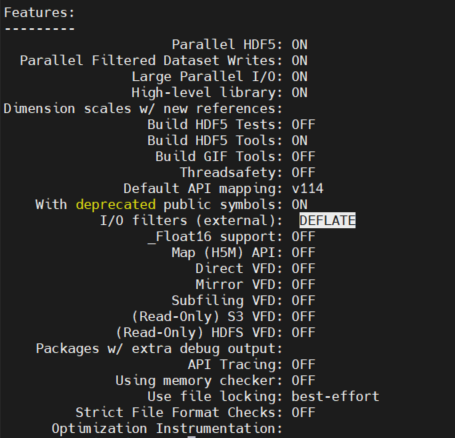
Here is the output of h5cc -showconfig
h5cc -showconfig
SUMMARY OF THE HDF5 CONFIGURATION
=================================

General Information:

               HDF5 Version: 2.1.0
              Configured on: 2026-04-08
              Configured by: Unix Makefiles
                Host system: Linux-4.18.0-553.100.1.el8_10.x86_64
          Uname information: Linux
                   Byte sex: little-endian
         Installation point: /cax/project/aerodynamics/tools/audi/moduleSoftware/hdf5/hdf5-2.1.0

Compiling Options:

                 Build Mode: Release
          Debugging Symbols: OFF
                    Asserts: OFF
                  Profiling: OFF
         Optimization Level: OFF

Linking Options:

                  Libraries:

Statically Linked Executables: OFF
LDFLAGS:
H5_LDFLAGS:
AM_LDFLAGS:
Extra libraries: m;dl;Threads::Threads
Archiver: /usr/bin/ar
AR_FLAGS:
Ranlib: /usr/bin/ranlib

Languages:

                          C: YES
                 C Compiler: /cax/project/aerodynamics/tools/audi/moduleSoftware/impi/impi-2021.17/bin/mpiicc 11.5.0
                   CPPFLAGS:
                H5_CPPFLAGS:
                AM_CPPFLAGS:
                     CFLAGS:   -std=c11  -fstdarg-opt -fdiagnostics-urls=never -fno-diagnostics-color -fmessage-length=0
                  H5_CFLAGS: -Wall;-Wcast-qual;-Wconversion;-Wextra;-Wfloat-equal;-Wformat=2;-Wformat-nonliteral;-Winit-self;-Winvalid-pch;-Wmissing-include-dirs;-Wshadow;-Wundef;-Wwrite-strings;-pedantic;-Wno-c++-compat;-Wbad-function-cast;-Wcast-align;-Wformat;-Wimplicit-function-declaration;-Wint-to-pointer-cast;-Wmissing-declarations;-Wmissing-prototypes;-Wnested-externs;-Wold-style-definition;-Wpacked;-Wpointer-sign;-Wpointer-to-int-cast;-Wredundant-decls;-Wstrict-prototypes;-Wswitch;-Wunused-but-set-variable;-Wunused-variable;-Wunused-function;-Wunused-parameter;-finline-functions;-Wno-aggregate-return;-Wno-inline;-Wno-missing-format-attribute;-Wno-missing-noreturn;-Wno-overlength-strings;-Wlarger-than=2584;-Wlogical-op;-Wframe-larger-than=16384;-Wpacked-bitfield-compat;-Wsync-nand;-Wno-unsuffixed-float-constants;-Wdouble-promotion;-Wtrampolines;-Wstack-usage=8192;-Wmaybe-uninitialized;-Wno-jump-misses-init;-Wstrict-overflow=2;-Wno-suggest-attribute=const;-Wno-suggest-attribute=noreturn;-Wno-suggest-attribute=pure;-Wno-suggest-attribute=format;-Wdate-time;-Warray-bounds=2;-Wincompatible-pointer-types;-Wint-conversion;-Wshadow;-Wduplicated-cond;-Whsa;-Wnormalized;-Wnull-dereference;-Wunused-const-variable;-Walloca;-Walloc-zero;-Wduplicated-branches;-Wformat-overflow=2;-Wformat-truncation=1;-Wrestrict;-Wattribute-alias;-Wshift-overflow=2;-Wcast-function-type;-Wmaybe-uninitialized;-Wcast-align=strict;-Wno-suggest-attribute=cold;-Wno-suggest-attribute=malloc;-Wattribute-alias=2;-Wmissing-profile;-Wc11-c2x-compat
                  AM_CFLAGS:
           Shared C Library: YES
           Static C Library: YES

                    Fortran: OFF
           Fortran Compiler:
              Fortran Flags:
           H5 Fortran Flags:
           AM Fortran Flags:
     Shared Fortran Library: YES
     Static Fortran Library: YES
           Module Directory: /cax/project/aerodynamics/tools/audi/moduleSoftware/hdf5/hdf5-2.1.0-build/mod

                        C++: OFF
               C++ Compiler: mpiicpc
                  C++ Flags:
               H5 C++ Flags:
               AM C++ Flags:
         Shared C++ Library: YES
         Static C++ Library: YES

                       JAVA: OFF
              JAVA Compiler:

Features:

                 Parallel HDF5: ON

Parallel Filtered Dataset Writes: ON
Large Parallel I/O: ON
High-level library: ON
Dimension scales w/ new references:
Build HDF5 Tests: OFF
Build HDF5 Tools: ON
Threads: ON
Threadsafety: OFF
Concurrency: OFF
Default API mapping: v200
With deprecated public symbols: ON
I/O filters (external):
_Float16 support: OFF
Map (H5M) API: OFF
Direct VFD: OFF
Mirror VFD: OFF
Subfiling VFD: OFF
(Read-Only) S3 VFD: OFF
(Read-Only) HDFS VFD: OFF
Packages w/ extra debug output:
API Tracing: OFF
Using memory checker: OFF
Use file locking: best-effort
Strict File Format Checks: OFF
Optimization Instrumentation:
General for ZSTD support:
- I built zstd-1.5.7 from source
- I built gcc + mpc + mpfr + gmp
- I built cmake
- I used intel-mpi offline-install libs/bins (potentially not needed in my case)
- I built hdf5
for using zstd I built a HDF5Plugin library via cmake from here: GitHub - aparamon/HDF5Plugin-Zstandard: Zstandard compression plugin for HDF5 · GitHub (probably an very old approach) and set the HDF5_PLUGIN_PATH accordingly.
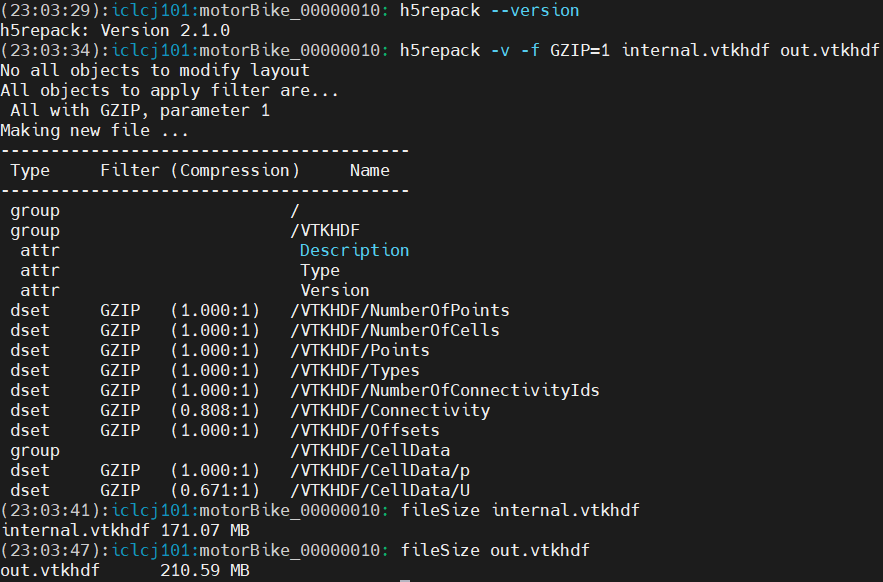
Anyway, I am not much interested in ZSTD because it is not natively supported by ParaView. However, the builtin GZIP which made a good job with HDF5 v1.14.6 (h5repack) does not compress with HDF5 v2.1.0 (h5repack) which I would like to understand.
Summing up: I want to get a compression of the file via h5repack with version 2.1.0 similarly to the h5repack of version 1.14.6.
For example. Inspecting the raw data from OpenFOAM (vtkhdf) while checking only the vector field U and scalar field p, we see (h5dump -pH <file>):
GROUP "CellData" {
         DATASET "U" {
            DATATYPE  H5T_IEEE_F32LE
            DATASPACE  SIMPLE { ( 102857676, 3 ) / ( 102857676, 3 ) }
            STORAGE_LAYOUT {
               CONTIGUOUS
               SIZE 1234292112
               OFFSET 4610275588
            }
            FILTERS {
               NONE
            }
            FILLVALUE {
               FILL_TIME H5D_FILL_TIME_IFSET
               VALUE  H5D_FILL_VALUE_DEFAULT
            }
            ALLOCATION_TIME {
               H5D_ALLOC_TIME_EARLY
            }
         }
         DATASET "p" {
            DATATYPE  H5T_IEEE_F32LE
            DATASPACE  SIMPLE { ( 102857676 ) / ( 102857676 ) }
            STORAGE_LAYOUT {
               CONTIGUOUS
               SIZE 411430704
               OFFSET 4198844884
            }
            FILTERS {
               NONE
            }
            FILLVALUE {
               FILL_TIME H5D_FILL_TIME_IFSET
               VALUE  H5D_FILL_VALUE_DEFAULT
            }
            ALLOCATION_TIME {
               H5D_ALLOC_TIME_EARLY
            }
         }
      }
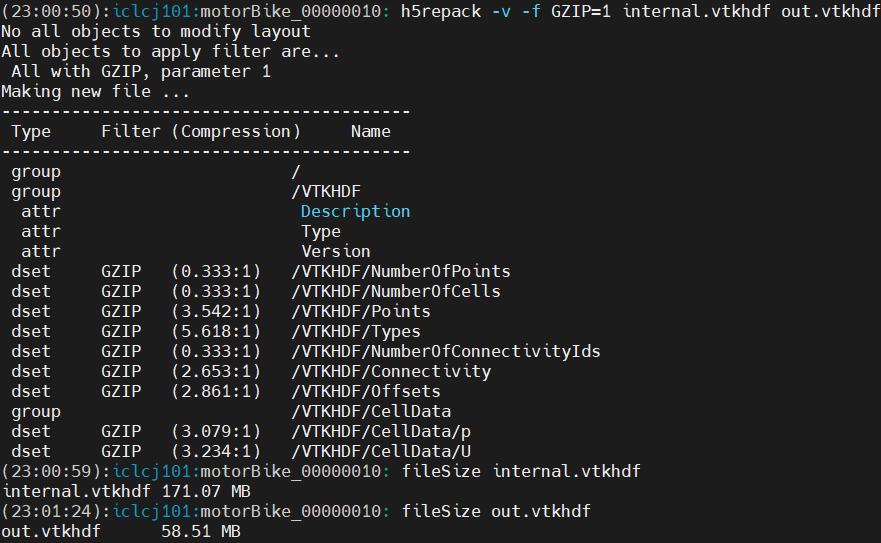
When I am doing the following with h5repack and version 1.14.6:
h5repack -v -f GZIP=1 internal.vtkhdf output.vtkhdf and inspecting it with h5dump again we get:
h5repack -v -f GZIP=1 internal.vtkhdf output.vtkhdf
No all objects to modify layout
All objects to apply filter are...
 All with GZIP, parameter 1
Making new file ...
-----------------------------------------
 Type     Filter (Compression)     Name
-----------------------------------------
 group                       /
 group                       /VTKHDF
  attr                        Description
  attr                        Type
  attr                        Version
 dset     GZIP   (0.333:1)   /VTKHDF/NumberOfPoints
 dset     GZIP   (0.333:1)   /VTKHDF/NumberOfCells
 dset     GZIP   (1.537:1)   /VTKHDF/Points
 dset     GZIP   (9.124:1)   /VTKHDF/Types
 dset     GZIP   (0.333:1)   /VTKHDF/NumberOfConnectivityIds
 dset     GZIP   (2.376:1)   /VTKHDF/Connectivity
 dset     GZIP   (2.880:1)   /VTKHDF/Offsets
 group                       /VTKHDF/CellData
 dset     GZIP   (1.626:1)   /VTKHDF/CellData/p
 dset     GZIP   (1.586:1)   /VTKHDF/CellData/U
      GROUP "CellData" {
         DATASET "U" {
            DATATYPE  H5T_IEEE_F32LE
            DATASPACE  SIMPLE { ( 102857676, 3 ) / ( 102857676, 3 ) }
            STORAGE_LAYOUT {
               CHUNKED ( 2796202, 3 )
               SIZE 778470231 (1.586:1 COMPRESSION)
            }
            FILTERS {
               COMPRESSION DEFLATE { LEVEL 1 }
            }
            FILLVALUE {
               FILL_TIME H5D_FILL_TIME_IFSET
               VALUE  H5D_FILL_VALUE_DEFAULT
            }
            ALLOCATION_TIME {
               H5D_ALLOC_TIME_EARLY
            }
         }
         DATASET "p" {
            DATATYPE  H5T_IEEE_F32LE
            DATASPACE  SIMPLE { ( 102857676 ) / ( 102857676 ) }
            STORAGE_LAYOUT {
               CHUNKED ( 8388608 )
               SIZE 252969472 (1.626:1 COMPRESSION)
            }
            FILTERS {
               COMPRESSION DEFLATE { LEVEL 1 }
            }
            FILLVALUE {
               FILL_TIME H5D_FILL_TIME_IFSET
               VALUE  H5D_FILL_VALUE_DEFAULT
            }
            ALLOCATION_TIME {
               H5D_ALLOC_TIME_EARLY
            }
         }
      }
While the file-size reduced from 5573 MB to 2815 MB.
Doing the same with version 2.1.0 we get:
h5repack -v -f GZIP=1 internal.vtkhdf output2.vtkhdf
No all objects to modify layout
All objects to apply filter are...
 All with GZIP, parameter 1
Making new file ...
-----------------------------------------
 Type     Filter (Compression)     Name
-----------------------------------------
 group                       /
 group                       /VTKHDF
  attr                        Description
  attr                        Type
  attr                        Version
 dset     GZIP   (1.000:1)   /VTKHDF/NumberOfPoints
 dset     GZIP   (1.000:1)   /VTKHDF/NumberOfCells
 dset     GZIP   (0.976:1)   /VTKHDF/Points
 dset     GZIP   (0.766:1)   /VTKHDF/Types
 dset     GZIP   (1.000:1)   /VTKHDF/NumberOfConnectivityIds
 dset     GZIP   (0.994:1)   /VTKHDF/Connectivity
 dset     GZIP   (0.943:1)   /VTKHDF/Offsets
 group                       /VTKHDF/CellData
 dset     GZIP   (0.943:1)   /VTKHDF/CellData/p
 dset     GZIP   (0.994:1)   /VTKHDF/CellData/U
And the output of the h5dump respectively:
      GROUP "CellData" {
         DATASET "U" {
            DATATYPE  H5T_IEEE_F32LE
            DATASPACE  SIMPLE { ( 102857676, 3 ) / ( 102857676, 3 ) }
            STORAGE_LAYOUT {
               CHUNKED ( 2796202, 3 )
               SIZE 1241513688 (0.994:1 COMPRESSION)
            }
            FILTERS {
               COMPRESSION DEFLATE { LEVEL 1 }
            }
            FILLVALUE {
               FILL_TIME H5D_FILL_TIME_IFSET
               VALUE  H5D_FILL_VALUE_DEFAULT
            }
            ALLOCATION_TIME {
               H5D_ALLOC_TIME_EARLY
            }
         }
         DATASET "p" {
            DATATYPE  H5T_IEEE_F32LE
            DATASPACE  SIMPLE { ( 102857676 ) / ( 102857676 ) }
            STORAGE_LAYOUT {
               CHUNKED ( 8388608 )
               SIZE 436207616 (0.943:1 COMPRESSION)
            }
            FILTERS {
               COMPRESSION DEFLATE { LEVEL 1 }
            }
            FILLVALUE {
               FILL_TIME H5D_FILL_TIME_IFSET
               VALUE  H5D_FILL_VALUE_DEFAULT
            }
            ALLOCATION_TIME {
               H5D_ALLOC_TIME_EARLY
            }
         }
      }
As already visible from the data, the size of the U/p files did not reduce compared to the original one. Hence, no GZIP compression was used. Either, the setup is somehow wrong or I am doing something wrong?
I also tried with Chunks + Shuffle + GZIP but did not work either.
Any idea whats going wrong here 
I am happy to share any other useful information .
Best Tobi